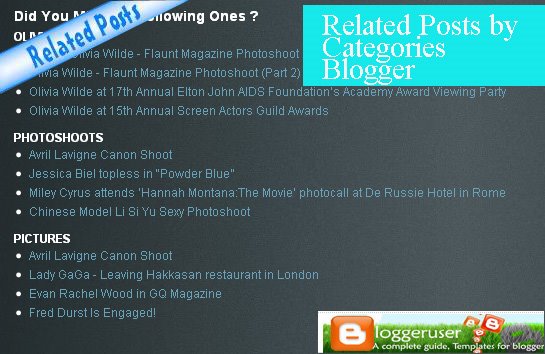
 Blogger/ Blogspot widget “Related posts by categories” shows related posts according to user defined categories at the end of each post. Another widget “Related posts widget for blogger” displays only a list of related posts but this widget shows posts under different labels, categories or tags. You can display desired posts under desired categories and also can specify the number of posts to display in your blogger blog. Needless to say, this widget will help your blog users to explore more related posts under the categories they are interested in.
Follow the specific instructions below to add this hack widget to your blog.
Follow the below steps properly and in order to have the similar widget you see in the pic above.
Widget Adding Instructions / Steps:
1. Go to Blogger Dashboard – click Edit Layout – then click Edit HTML
Wait: Before Editing your Template, Save a copy of your current template by clicking ‘Download Full Template’ in ‘Edit HTML’ page of the Blogger ‘Layout’ Window and ‘Preview’ the changes before Saving.
2. Check the ‘expand Widgets Template Box” as shown in the figure below.
Check widgets Template Box
3.Then Search (Ctrl+F) the code given below in your template:
<data:post.body/>
4. Copy and Add the code given below just after the above code:
<b:if cond=’data:blog.pageType == “item”‘>
<div class=’similiar’>
<div class=’widget-content’>
<h3>Related Posts by Categories</h3>
<div id=’data2007′/><br/><br/>
<script type=’text/javascript’>
var homeUrl3 = "<data:blog.homepageUrl/>";
var maxNumberOfPostsPerLabel = 4;
var maxNumberOfLabels = 10;
maxNumberOfPostsPerLabel = 100;
maxNumberOfLabels = 3;
function listEntries10(json) {
var ul = document.createElement('ul');
var maxPosts = (json.feed.entry.length <= maxNumberOfPostsPerLabel) ?
json.feed.entry.length : maxNumberOfPostsPerLabel;
for (var i = 0; i < maxPosts; i++) {
var entry = json.feed.entry[i];
var alturl;
for (var k = 0; k < entry.link.length; k++) {
if (entry.link[k].rel == 'alternate') {
alturl = entry.link[k].href;
break;
}
}
var li = document.createElement('li');
var a = document.createElement('a');
a.href = alturl;
if(a.href!=location.href) {
var txt = document.createTextNode(entry.title.$t);
a.appendChild(txt);
li.appendChild(a);
ul.appendChild(li);
}
}
for (var l = 0; l < json.feed.link.length; l++) {
if (json.feed.link[l].rel == 'alternate') {
var raw = json.feed.link[l].href;
var label = raw.substr(homeUrl3.length+13);
var k;
for (k=0; k<20; k++) label = label.replace("%20", " ");
var txt = document.createTextNode(label);
var h = document.createElement('b');
h.appendChild(txt);
var div1 = document.createElement('div');
div1.appendChild(h);
div1.appendChild(ul);
document.getElementById('data2007').appendChild(div1);
}
}
}
function search10(query, label) {
var script = document.createElement('script');
script.setAttribute('src', query + 'feeds/posts/default/-/'
+ label +
'?alt=json-in-script&callback=listEntries10');
script.setAttribute('type', 'text/javascript');
document.documentElement.firstChild.appendChild(script);
}
var labelArray = new Array();
var numLabel = 0;
<b:loop values=’data:posts’ var=’post’>
<b:loop values=’data:post.labels’ var=’label’>
textLabel = "<data:label.name/>";
var test = 0;
for (var i = 0; i < labelArray.length; i++)
if (labelArray[i] == textLabel) test = 1;
if (test == 0) {
labelArray.push(textLabel);
var maxLabels = (labelArray.length <= maxNumberOfLabels) ?
labelArray.length : maxNumberOfLabels;
if (numLabel < maxLabels) {
search10(homeUrl3, textLabel);
numLabel++;
}
}
</b:loop>
</b:loop>
</script>
</div>
</div>
</b:if>
5. Save your Template. That’s it.
Widget Customization
Customize Blogger WidgetYou can change the number of maximum related posts being displayed, search for the code below (within the code given in step 4) and change the number “3″ to any desired number. Its good to have related posts in accordance with the space available to display. Generally, two or three categories is enough. However, you may display the number of categories and posts as you wish.
maxNumberOfLabels = 3;
Widget Use and Summary
In conclusion, this widget is not only an important widget for making your blog look professional but also an important widget to help users to quickly navigate or move on to other important and related posts.
Help and Comment
Help and comment
If you have any problems or any queries related to this widget, Please leave a comment below and I would be glad to help you !
Meanwhile, you can also visit “Related Posts Widget for Blogger / Blogspot” for a similar widget. You can also visit CELEBSIMAGE, one of the celebrity blogs which has this widget in action.
Also I want to know your view about this widget. So Comment !

Thanks for your guide, i love this widget so much!
I am glad if you could help me to clear my doubt.
Is it this widget cant support Chinese Word? Or something wrong i have done?
Example (one of my blog’s post) : http://khchuang888.blogspot.com/2009/05/leg-pitting-edema-cause-by-pregnancy.html
Really appreciate for your guidance and assistance.
You could email me: [email protected]
hi elims Chuang, i am glad that this widget helped you.
I have checked out your blog post and i see the widget is in action. Its working properly.
Let me know if you have any problems.
Dear Pradeep, Pls check on this: http://khchuang888.blogspot.com/2009/05/vote-english-name-for-my-future-baby.html
Under the ‘Related Posts by Categories’… You can see the name with something like…
‘Pregnancy %E6%80%80%E5%AD%95%E6%9C%9F%E9%97%B4’ (should be : Pregnancy 怀孕期间)
‘Survey %E8%B5%84%E6%96%99%E6%94%B6%E9%9B%86’ (should be : Survey 资料收集)
My question is, do your widget not support Chinese words?
Thanks for clearing my doubt ya~
Appreciated!
Have a nice day!
Regards,
elims Chuang
http://khchuang888.blogspot.com/
@ elims Chuang 光宏
Oh ok i too had seen that error when i visited your blog last time.
I think the problem is wat you say.. it many not be supporting chinese characters. (well, i guess you have not misplaced any code)
Thanks and keep blogging.
hye, how to show a related post for only 1 label @ category. Let say we have a label named "English Contents", how to show only the recent posts that fall under this category.
Please help me.tq.
@ æy®
Hi, see you can show related posts for only one category by labeling that post with that specific lable. Take your own example, if you want to display recent posts under "English Content", just label that post with English Content only.
I hope thats the best way.
[…] Please leave a comment below and I would be glad to help you ! Meanwhile, you can also visit “Related posts by category Blogger widget” for a similar widget. Also I want to know your view about this widget. So Comment ! Hello there! […]
tanks friend please comment back
Hi, I was wondering if it is possible to make the list of related posts in random order? Because it seems to follow a certain order and some of the related posts do not show up.
Hope you can help me. thanks
Hi,
I am getting the following error, please help
Your template could not be parsed as it is not well-formed. Please make sure all XML elements are closed properly.
XML error message: Open quote is expected for attribute “{1}” associated with an element type “cond”.
Thanks
Priya
this is ausum
thnx nice post